What Is a GPS Tracker Communication Protocol?
A GPS tracking device does much more than calculate latitude and longitude.
To display a vehicle, employee, livestock collar or asset tracker on a web platform, the device must first collect positioning information and then transmit that information to a server.
The rules that define how the tracker and server exchange this information are called the GPS tracker communication protocol.
A typical GPS tracker protocol defines:
- Device identification
- Server connection procedures
- GPS location data format
- Time and date format
- Network status
- Battery voltage
- Device status
- Alarm information
- Heartbeat packets
- Command responses
- Remote configuration
- Data acknowledgement
- Firmware or parameter information
Without a correctly implemented protocol, the GPS hardware may obtain an accurate GNSS position but the tracking platform will still be unable to understand the device.
For OEM GPS tracker projects, communication protocol design is therefore one of the most important links between hardware, firmware and the cloud platform.
How Does a GPS Tracker Send Data to a Server?
The basic data path normally looks like this:
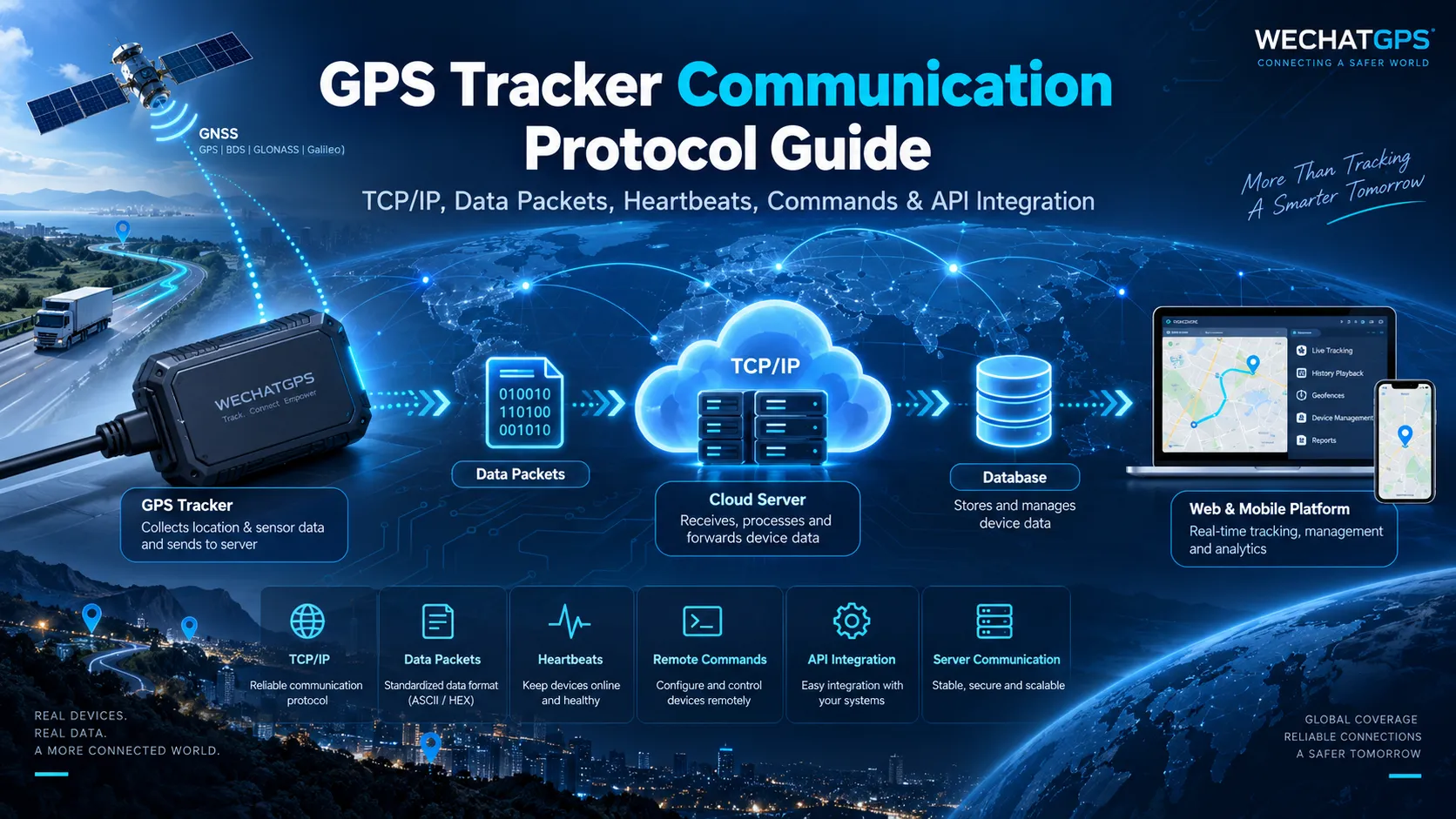
GNSS Satellites → GPS Tracker → Cellular / LoRaWAN / Satellite Network → Internet or Gateway → Tracking Server → Database → Web Platform / Mobile App
Inside the tracking device, the GNSS module calculates positioning information such as:
- Latitude
- Longitude
- UTC time
- Speed
- Direction
- Satellite status
- Positioning validity
The device MCU then combines this information with other data.
Depending on the application, this can include:
- Battery level
- External power voltage
- ACC status
- Temperature
- SOS status
- Movement status
- Sensor information
- Geofence events
- Device removal alarm
- Signal strength
- Mileage
- RFID data
The communication module then sends the formatted packet to the designated server.
TCP vs UDP for GPS Tracker Communication
Most cellular GPS trackers communicate with a cloud server using TCP or UDP over the mobile network.
TCP Communication
TCP creates a connection between the GPS device and server before data transmission.
Its advantages include:
- Reliable data transmission
- Packet acknowledgement
- Ordered delivery
- Retransmission when packets are lost
- Better suitability for command interaction
TCP is widely used for vehicle GPS trackers, personnel tracking devices, livestock trackers and industrial IoT terminals where reliable communication is important.
A simplified connection may look like:
Device → TCP Connection → Login Packet → Server ACK → GPS Data → Server ACK
The device can keep the connection alive and continuously send location or alarm information.
UDP Communication
UDP does not maintain the same type of persistent connection.
Its advantages can include:
- Lower protocol overhead
- Fast packet transmission
- Reduced connection management
- Potential power savings for certain applications
However, packet delivery is not guaranteed by UDP itself.
The application layer may therefore require its own packet number, acknowledgement or retransmission mechanism.
For battery-powered IoT trackers, the choice between TCP and UDP should be evaluated together with reporting frequency, network conditions and power consumption.
1. Device Login Packet
When a GPS tracker connects to the platform, it normally sends a login or registration packet.
This allows the server to identify the device.
Typical fields can include:
- IMEI
- Device ID
- Serial number
- Protocol version
- Product model
- Firmware version
- SIM information
- Network status
For example, the server may receive a unique IMEI and use it to locate the corresponding device account.
If the device has already been registered, the server accepts the connection and returns an acknowledgement.
If it is not registered, the server may reject it or place it into an unassigned-device list.
Why Device Identification Matters
In large deployments, thousands or hundreds of thousands of GPS trackers may connect to the same server.
Each device therefore requires a unique identity.
Correct device authentication prevents location information from being associated with the wrong user, employee, vehicle or asset.
2. GPS Location Packet
The location packet is one of the core elements of a GPS tracking protocol.
A location message may contain:
- Device ID
- GPS time
- Latitude
- Longitude
- Speed
- Direction
- Altitude
- Number of satellites
- GNSS positioning status
- Cellular signal strength
- Battery voltage
- External power status
- Device status
Different manufacturers use different packet structures.
Some protocols transmit readable ASCII text, while others use hexadecimal binary packets to reduce data size.
ASCII Protocol Example
A simplified message might conceptually contain:
Device ID, Time, Latitude, Longitude, Speed, Battery, Status
ASCII protocols are relatively easy for engineers to read during development and debugging.
Binary Protocol
Binary protocols encode data into bytes.
This can reduce packet length and cellular traffic, which is useful when devices transmit frequently or when very large fleets are deployed.
However, the server must correctly parse every byte according to the protocol specification.
3. Heartbeat Packet
A GPS tracker does not always need to transmit a full GPS location packet.
When there is no new positioning information, the device may send a smaller heartbeat packet.
The heartbeat tells the server:
“The device is still connected and operating normally.”
Heartbeat information can include:
- Device ID
- Battery level
- Signal strength
- Network status
- Charging status
- Device state
The platform can use heartbeat information to determine whether a tracker is online or offline.
For example, if no heartbeat or location packet is received within a configured time period, the system can mark the device as offline.
Heartbeat Interval Design
The heartbeat interval must balance:
Online visibility vs battery consumption and network traffic.
A heartbeat every few seconds may be appropriate for certain powered vehicle terminals but usually makes little sense for an ultra-low-power battery asset tracker.
For battery-powered products, heartbeat strategy should be designed together with sleep mode and reporting intervals.
4. Alarm Messages
Modern GPS trackers do more than report locations.
They can detect events and immediately upload alarm packets.
Common GPS tracker alarms include:
- SOS alarm
- Low battery alarm
- External power cut alarm
- Device removal alarm
- Vibration alarm
- Movement alarm
- Overspeed alarm
- Geofence entry
- Geofence exit
- ACC ignition event
- Fall or man-down alarm
- Offline recovery
- Temperature alarm
For personnel tracking projects, an SOS event may need higher priority than an ordinary location report.
When a worker presses the SOS button, the device can immediately wake the communication module and upload an emergency event.
The server then associates the alarm with:
- Employee identity
- Device number
- Alarm time
- Latest location
- Department
- Worksite
- Alarm type
The control center can then process the incident.
5. Server Acknowledgement
Reliable GPS communication usually requires the server to acknowledge important packets.
The basic workflow is:
Tracker sends data → Server receives data → Server parses packet → Server sends ACK
Once the tracker receives the acknowledgement, it knows that the message was successfully accepted.
If no acknowledgement is received, the tracker may retry according to firmware rules.
This is especially important for:
- SOS alarms
- Critical geofence events
- Configuration commands
- Device login
- Important status changes
A good protocol should clearly define:
- Which packets require ACK
- ACK packet format
- Timeout period
- Maximum retry count
- Duplicate packet handling
6. Remote Commands
Communication is not only from the GPS tracker to the server.
The server may also send instructions back to the device.
Typical GPS tracker commands include:
- Change reporting interval
- Request current location
- Restart device
- Change server IP
- Change server port
- Configure APN
- Configure geofence
- Enable or disable functions
- Set working mode
- Modify sleep settings
- Query firmware version
- Configure SOS numbers
- Configure sensor parameters
Vehicle tracking projects may also support additional authorized control functions depending on hardware configuration and project requirements.
Command Confirmation
After receiving a command, the GPS tracker should normally return a command response.
For example:
Server → Set reporting interval to 60 seconds
The device processes the instruction and returns:
Device → Command successfully applied
This makes remote device management much more reliable.
7. Offline Data Storage
Mobile networks are not always available.
A livestock tracker may enter a remote pasture.
A vehicle may enter an underground parking area.
An employee tracking device may temporarily lose cellular coverage inside a building.
Instead of discarding the location information, a GPS tracker can store unsent data in local memory.
When communication is restored, stored records can be uploaded to the server.
The protocol therefore needs to distinguish between:
- Real-time data
- Historical stored data
- Alarm data
- Re-uploaded data
The server should preserve the original GPS timestamp rather than treating all uploaded records as newly generated positions.
8. GPS Tracker API Integration
There are two common ways to integrate GPS tracking hardware with another system.
Device Protocol Integration
The customer's server directly connects to the GPS tracker.
The customer must implement the device communication protocol.
The server must handle:
- TCP or UDP connections
- Device login
- Packet parsing
- Heartbeats
- Location reports
- Alarm processing
- Remote commands
- Disconnections
- Reconnection
- Data storage
This approach provides deep control but requires backend development.
GPS Tracking API Integration
Another method is to connect the GPS devices to an existing tracking platform first.
The customer's application then accesses information using an API.
Typical API data can include:
- Device list
- Current location
- Historical tracks
- Alarm records
- Device online status
- Battery status
- Employee information
- Vehicle information
API integration is often easier for customers who want GPS data inside their ERP, workforce-management system, fleet-management system or other business software without developing the complete device-access layer.
Device Protocol vs API: What Is the Difference?
Although the terms are sometimes mixed together, they solve different integration problems.
GPS Device Protocol
Used mainly between:
GPS hardware ↔ GPS server
The protocol controls how raw device data is transferred.
API
Used mainly between:
GPS platform ↔ Customer software
The API provides processed information to another application.
In a complete GPS tracking architecture, both can exist at the same time.
For example:
GPS Device → TCP Protocol → GPS Platform → REST API → Customer ERP
This architecture allows the device communication layer and business application layer to remain separate.
9. Private GPS Server Integration
Many enterprise customers do not want to use only a public tracking platform.
They may require GPS devices to connect directly to their own server.
This is common in applications such as:
- Government projects
- Large fleet management
- Employee safety systems
- Industrial tracking
- Mining projects
- Logistics
- Livestock management
- Financial vehicle tracking
- Security applications
For private-server integration, the following information should normally be confirmed before development:
- Server IP address or domain
- TCP or UDP
- Port number
- APN requirements
- Device authentication
- Encryption requirements
- Data packet format
- Reporting interval
- Alarm definitions
- Command definitions
- Server ACK mechanism
- Reconnection rules
- Data storage requirements
A test environment should normally be prepared before mass deployment.
10. GPS Tracker Protocol Security
Location data can contain sensitive operational information.
Protocol security should therefore be considered during system design.
Possible security measures include:
- Device authentication
- Unique device credentials
- TLS-encrypted communication
- API authentication
- Access tokens
- IP restrictions
- User permission management
- Command authorization
- Server-side logging
- Firmware validation
The appropriate security architecture depends on the project.
A simple consumer tracker and an industrial personnel safety system may have very different requirements.
11. Designing a Protocol for Low-Power GPS Trackers
Protocol design directly affects battery life.
Every time a cellular module wakes up, registers on a network and transmits data, energy is consumed.
Low-power products therefore require more than simply installing a larger battery.
Firmware and communication behavior must be designed together.
Possible optimization methods include:
Reduce Unnecessary Packets
Do not continuously send identical data if the application does not need it.
Use Compact Payloads
Reducing transmitted bytes can reduce communication time and network traffic.
Combine Data
Multiple sensor values can sometimes be included in one packet.
Use Sleep Mode
Allow the MCU, GNSS module and communication module to sleep when tracking is not required.
Dynamic Reporting
A device may report less frequently while stationary and increase the reporting rate when movement is detected.
For example:
Stationary asset → long reporting interval
Moving asset → shorter reporting interval
Alarm event → immediate upload
This event-driven communication strategy is commonly used in battery-powered GPS and IoT tracking devices.
12. Large-Scale GPS Server Architecture
A small GPS platform may initially manage hundreds of trackers.
Enterprise projects can eventually grow to tens of thousands or hundreds of thousands of devices.
The communication architecture should therefore consider scalability from the beginning.
A large GPS platform may include:
Device Access Layer
Maintains TCP connections and receives tracker packets.
Protocol Parsing Service
Converts different manufacturer protocols into standardized internal data.
Message Queue
Distributes positioning and alarm events to backend services.
Redis
Can be used for online status, sessions and frequently accessed device information.
Relational Database
Stores users, devices, organizations, permissions, geofences and configuration information.
Time-Series or Analytical Database
Can store large volumes of historical location records.
Alarm Service
Processes SOS, geofence, low-battery and other events.
Command Service
Manages instructions sent from the platform to online devices.
API Service
Provides standardized interfaces to customer applications.
A modular architecture is easier to scale than placing every function inside one server process.
13. Multi-Protocol GPS Platform Integration
Many GPS tracking companies eventually need to support devices from multiple manufacturers.
The challenge is that different manufacturers use different communication protocols.
One tracker may report battery voltage as:
3.95V
Another may report:
3950mV
Another may encode the same value as two hexadecimal bytes.
A multi-protocol platform should therefore convert different device formats into a standardized internal model.
For example:
Manufacturer Protocol A
↓
Protocol Parser
↓
Standard Device Data
↓
Platform
The standardized data might contain:
- Device ID
- Time
- Latitude
- Longitude
- Speed
- Battery
- Network
- Alarm
- Device status
This makes it easier to support new GPS hardware without rewriting the entire platform.
14. How to Test a GPS Tracker Communication Protocol
Protocol testing should begin before mass production.
A typical test process includes:
Step 1: Device Registration
Confirm that the server correctly identifies the IMEI or device ID.
Step 2: TCP Connection
Verify connection, disconnection and automatic reconnection.
Step 3: GPS Position Testing
Compare uploaded latitude and longitude with the actual device location.
Step 4: Heartbeat Testing
Verify online/offline status and heartbeat intervals.
Step 5: Alarm Testing
Trigger SOS, low battery, geofence and other supported alarms.
Step 6: Remote Command Testing
Send configuration commands and confirm device responses.
Step 7: Network Loss Testing
Remove cellular connectivity and verify offline storage and later re-upload.
Step 8: Long-Term Stability Testing
Keep multiple devices online for extended periods and observe reconnection, memory usage and server stability.
Step 9: Load Testing
For large deployments, simulate thousands of simultaneous device connections and location reports.
Step 10: Field Testing
Finally, test the device under real installation conditions instead of relying only on laboratory testing.
Common GPS Protocol Development Problems
Device Connects but No Location Appears
Possible causes include:
- Incorrect packet parsing
- Invalid GPS data
- Coordinate conversion error
- Device ID mismatch
- Incorrect protocol version
Device Repeatedly Disconnects
Check:
- Mobile network quality
- TCP timeout settings
- Heartbeat interval
- Server connection management
- APN configuration
Commands Are Not Executed
Check:
- Device online status
- Command format
- Serial number or packet sequence
- Checksum
- ACK logic
- Firmware command support
Duplicate Historical Tracks
The server should identify retransmitted packets using timestamps, packet IDs or other protocol fields.
Wrong Time on the Platform
GPS data often uses UTC.
The backend or frontend should convert UTC to the user's required timezone rather than modifying the original GNSS timestamp incorrectly.
Choosing a GPS Tracker for Your Own Platform
If you already operate a GPS tracking platform, ERP system or IoT platform, ask the hardware supplier several questions before purchasing devices.
- Is the GPS communication protocol available?
- Does the tracker support TCP or UDP?
- Can the server IP and port be customized?
- Can reporting intervals be remotely configured?
- Are command definitions documented?
- Can the firmware be modified?
- Does the device support offline data storage?
- Are alarm packets clearly documented?
- Can the tracker connect to a private server?
- Is API integration available?
- Can protocol integration support large deployments?
- Is technical support available during debugging?
These questions are particularly important for OEM projects because long-term platform compatibility can be more important than the initial hardware price.
Custom GPS Tracker Protocol Development
For some projects, an existing GPS protocol is sufficient.
Other applications require customized firmware and communication logic.
Examples include:
- Custom personnel safety badges
- Livestock GPS tracking collars
- Asset trackers
- Vehicle finance GPS trackers
- Electronic GPS seals
- Satellite GPS terminals
- Low-power IoT trackers
- Specialized industrial sensors
A customized project may require changes to:
- Data packet format
- Reporting logic
- Sensor data
- Alarm definitions
- Remote commands
- Server address configuration
- Encryption
- Power-saving strategy
- API interfaces
Shenzhen Jinshengchang Technology Co., Ltd. provides OEM and ODM GPS tracking device development covering hardware design, PCB development, firmware, communication protocols, GPS tracking platforms, mobile applications, APIs and private-server integration.
The objective is not simply to make a GPS tracker transmit coordinates.
A reliable tracking system requires the hardware, firmware, protocol, network, server and application platform to work as one complete architecture.
FAQ
What protocol do GPS trackers use?
Many cellular GPS trackers use manufacturer-specific application protocols over TCP/IP or UDP. The exact packet format varies between manufacturers and product models.
Can a GPS tracker connect to my own server?
Yes, if the device firmware supports configurable server addresses and the communication protocol is available or customized for the project.
What is a GPS tracker TCP protocol?
It is the application-level message structure used by a tracker to exchange information with a server through a TCP connection.
What is the difference between GPS protocol and GPS API?
The device protocol connects GPS hardware to the tracking server. An API normally connects the tracking platform to another software system.
Can GPS tracker firmware be customized?
For OEM and ODM projects, firmware can be developed or modified to support specific reporting intervals, alarms, commands, sensors, server protocols and power-management requirements.
Can one server support different GPS trackers?
Yes. A multi-protocol platform can use separate protocol parsers to convert different tracker packet formats into a common internal data structure.
Does reporting frequency affect battery life?
Yes. More frequent GNSS positioning and cellular transmission generally increase power consumption. Reporting strategy should therefore be designed according to application requirements and target battery life.
Conclusion
A GPS tracker communication protocol is the bridge between the physical tracking device and the software platform.
A complete protocol needs to manage much more than latitude and longitude. It should define device authentication, GPS data, heartbeats, alarms, acknowledgements, remote commands, offline records and server interaction.
For a small project, these functions may appear simple.
For a deployment involving thousands or hundreds of thousands of GPS devices, protocol architecture, connection management, database design and server scalability become critical.
When developing a custom GPS tracker, communication protocol design should therefore begin at the same time as hardware and firmware development—not after the hardware has already been completed.
For OEM GPS tracker projects requiring custom hardware, firmware, private-server integration, API development or communication protocol customization, WECHATGPS can provide a complete development path from prototype design to mass production.