GPS Geofence Boundary Warning: Automatic Tracking Modes Near the Perimeter
A GPS geofence usually helps operators identify when a tracked device enters or leaves a defined area. However, some applications need closer monitoring as the device approaches the boundary.
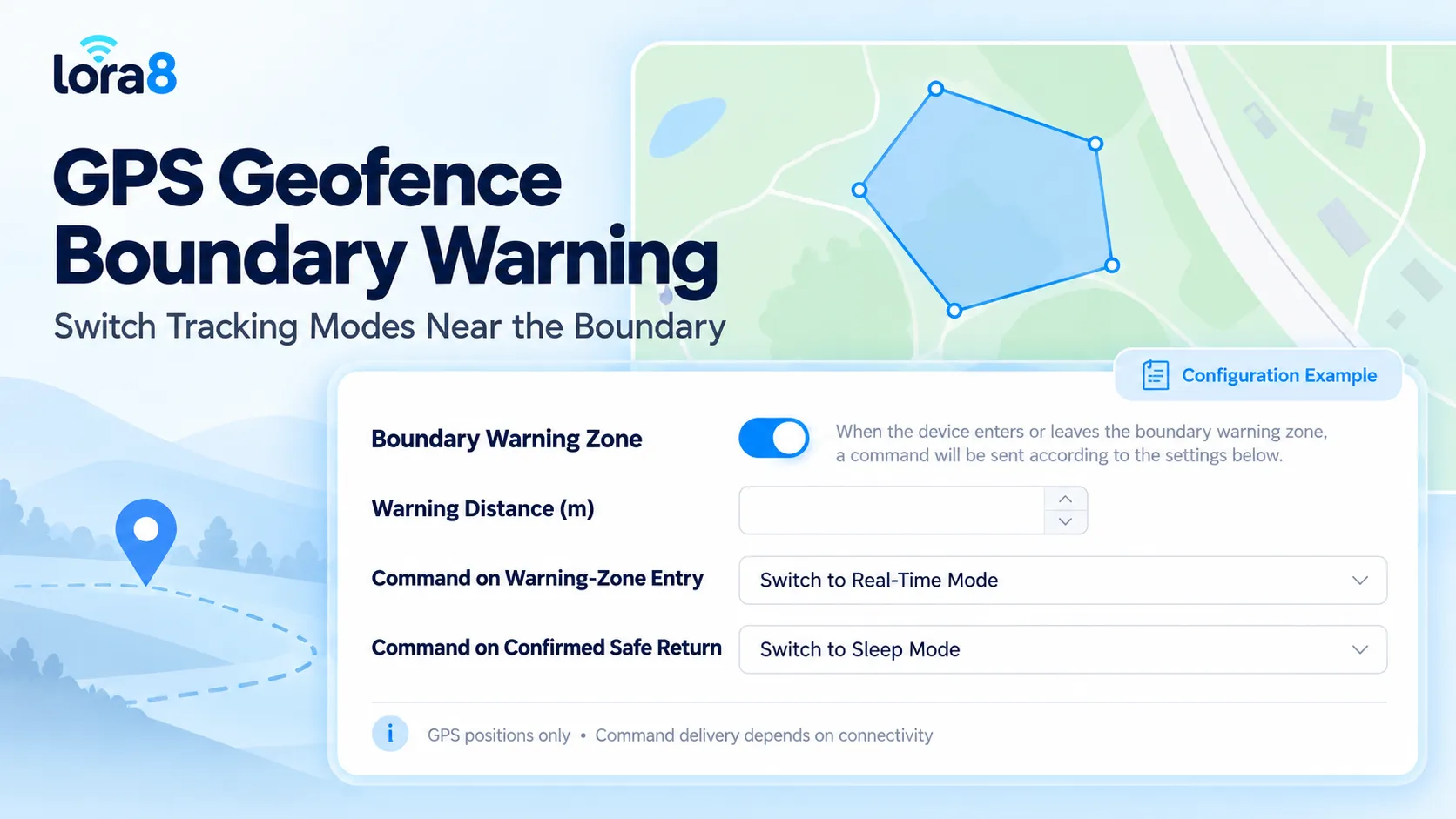
The new boundary warning feature in the lora8 platform adds a configurable zone around the geofence perimeter. It connects location conditions with device commands, allowing compatible trackers to change their operating behavior when closer attention is needed.
One practical configuration is to request real-time tracking near the boundary and restore a supported sleep mode after a confirmed return to the safe area.
What Is a GPS Geofence Boundary Warning?
A GPS geofence boundary warning uses a defined distance on both sides of a geofence boundary.
This creates a transition area between the interior safe area and locations farther outside the geofence.
According to the feature settings, the platform sends one command set when a device enters the warning zone or moves outside the geofence. It sends a second command set after the device returns to the safe area and that return is confirmed.
The feature uses GPS positions for this evaluation.
| Location condition | Configured action |
|---|---|
| Device enters the boundary warning zone | Send the first command set |
| Device moves outside the geofence | Trigger the first command set according to the feature logic |
| Device returns to the safe area and the return is confirmed | Send the second command set |
The available commands depend on the connected device and its firmware.
How Is This Different from an Exit Alert?
An exit alert tells an operator that a reported position has crossed a boundary.
The boundary warning feature adds a configurable response around that boundary. Instead of only generating a notification, it can initiate a supported change in device operation.
For example, a battery-powered tracker may normally use a lower-frequency reporting profile. When a GPS report places it in the warning zone, the platform can send a command requesting more frequent tracking.
After a confirmed safe return, another command can request the normal power-saving profile.
Entry and exit alerts remain separate settings in the interface. Operators should configure notifications and command actions according to their own monitoring requirements.
Example: Livestock Collar Tracking Near a Pasture Boundary
Consider a GPS collar used to monitor cattle within a grazing area.
While an animal remains well inside the assigned area, the collar may operate with a power-saving reporting schedule. When a reported GPS position reaches the warning zone, the platform can request a supported real-time tracking mode.
More frequent updates can help the farmer review subsequent movement and determine whether the animal is moving along the boundary, leaving the pasture or returning inward.
Once the return to the safe area is confirmed, the platform can send the configured command to restore sleep mode.
This is a location-based tracking workflow. The displayed feature does not, by itself, establish sound, vibration or electric-pulse control, and it does not physically prevent an animal from crossing a boundary.
Balance Tracking Detail and Battery Use
Running a battery-powered tracker at a high reporting frequency throughout the day may be unnecessary for some applications.
Boundary-based mode switching provides a way to concentrate more detailed tracking around a location condition that deserves attention.
Potential benefits include:
- More frequent position updates after a supported mode change.
- Less need for operators to switch modes manually.
- A defined return to the normal operating profile.
- A configurable response for different monitored areas.
Battery savings are not guaranteed. They depend on how often the device enters the warning zone, how long it remains in the higher-frequency mode, signal conditions and the device’s power consumption.
A tracker frequently operating near the perimeter may spend considerable time in its active profile.
Select a Warning Distance That Fits the Application
A warning distance should reflect both movement and reporting behavior.
If a tracker sleeps between reports, the platform cannot evaluate positions that have not yet been received. A device may therefore move across a narrow warning band between two updates.
As a planning illustration, an object moving at one meter per second can travel approximately 300 meters during a five-minute reporting gap. This is not a recommended warning distance; it demonstrates why speed and update intervals must be considered together.
Evaluate:
- Expected movement speed.
- Normal GPS reporting interval.
- Position uncertainty.
- Communication and command-delivery delay.
- Geofence shape and available interior space.
A larger warning distance also extends farther into the geofence. For a small or narrow area, it may leave little usable safe interior.
If the required warning distance does not fit the site, consider a shorter normal reporting interval or a different operating profile instead of simply increasing the distance.
A Command Trigger Is Not Instant Device Execution
The platform can identify a condition only after receiving an eligible GPS position.
The requested mode change then depends on the command-delivery path and the device’s ability to receive and apply the instruction.
A sleeping or disconnected tracker may not respond immediately. For this reason, “real-time mode” should be understood as a supported reporting profile, not a promise of zero delay.
During deployment, verify the full sequence:
- The device reports its GPS position.
- The platform identifies the boundary condition.
- The platform sends the selected command.
- The device receives and applies it.
- Later reports show the expected operating behavior.
Where command acknowledgements or configuration reports are available, use them to verify the result.
Confirm Safe Return Before Restoring Sleep Mode
Returning just inside the geofence boundary is not necessarily the same as returning to the safe interior.
The device may still be within the inner portion of the warning zone.
The second command should follow the feature’s confirmed-safe-return logic. This distinction helps operators understand why a tracker may remain in its active profile even after appearing slightly inside the boundary.
The screenshot does not specify the confirmation duration or number of required position reports. These details should be checked in the deployed implementation and tested before rollout.
Applications Beyond Livestock
The same concept can be evaluated for other compatible GPS devices.
For mobile assets, it can request more frequent updates when equipment approaches a storage-yard boundary.
For rental equipment, it can support closer monitoring around an assigned work area.
For vehicles, it can change a supported reporting profile near a depot or operating-zone perimeter.
Each application needs its own configuration. A suitable setting for slowly moving livestock may be inappropriate for a vehicle traveling at road speed.
Test the Feature Before Deployment
Begin with a small pilot using the intended device model and firmware.
Test entry into the warning zone, movement outside the geofence and a return to the safe interior. Include a case in which the device passes through the warning zone between scheduled reports.
Also verify behavior during temporary network loss and repeated movement near the boundary.
Record GPS measurement times, platform receipt times, command events and the reporting intervals observed afterward. This shows whether the complete workflow meets the project’s needs.
Configure the New Feature for Your GPS Project
The lora8 boundary warning feature connects geofence monitoring with configurable device commands.
For an implementation with Shenzhen Jinshengchang Technology Co., Ltd., specify the tracker model, communication method, geofence dimensions, normal reporting interval and desired commands.
With a suitable configuration, the feature can provide closer tracking near the perimeter and restore a lower-power operating mode after a confirmed safe return.
Frequently Asked Questions
Does the feature work with Wi-Fi or cellular location estimates?
The displayed setting states that it recognizes GPS positions only. Other positioning sources should not be assumed to trigger this workflow.
Does entering the warning zone always activate real-time tracking?
Only if that command is selected and supported by the device. The interface allows the operator to choose the command.
Can it detect a crossing while the tracker is asleep?
A platform-based workflow needs a reported position to evaluate the condition. It cannot continuously observe movement during a reporting gap.
Does returning inside the geofence immediately activate sleep mode?
Not necessarily. The device must return to the safe area and satisfy the implementation’s confirmation logic before the second command is triggered.